GitHub

What Is GitHub? And What Is It Used For?

What is GitHub

GitHub is an online software development platform. It's used for storing, tracking, and collaborating on software projects.

It makes it easy for developers to share code files and collaborate with fellow developers on open-source projects. GitHub also serves as a social networking site where developers can openly network, collaborate, and pitch their work.

GitHub allows software developers and engineers to create remote, public-facing repositories on the cloud for free. A repository, or "repo" for short, is a coding project’s files and the revision history for each file. Once you’ve set up a repository on GitHub, you can copy it to your device, add and modify files locally, then "push" your changes back to the repository where your changes display for the public.
What is Git

Git is a version control system used for tracking changes in computer files. It is generally used for source code management in software development.
  • Git is used to tracking changes in the source code
  • The distributed version control tool is used for source code management
  • It allows multiple developers to work together
  • It supports non-linear development through its thousands of parallel branches

some feature of oF Git are Tracks history, Free and open source, Supports non-linear development, Creates backups, Scalable, Supports collaboration, Branching is easier, Distributed development

Learn More about GitHub?...
Why do developers need Git?

Sometimes developers use Git without GitHub. They keep the code and work on the project together with other collaboration tools such as GitLab, and BitBucket. GitHub, however, is the most popular choice. Git is the most popular VCS. Developers use it for inner peace and convenience. You will create a repository with branches, commits, and code. With Git, a beginner can create personal projects that can be included in a portfolio. Over time, you can track your progress and see what you can improve on. Git helps you experiment with different ideas and develop your know-how without harming the project. not all experienced developers are Git power users. Many of them don’t know most of the commands by heart. They google them. So don’t be shy about your knowledge gaps — they say nothing about you as a specialist. You don’t need a deep knowledge of the system to begin using it — only the basic commands. For example:

  • git init — create a new repository
  • git status — check for changes in the branch
  • git add — index all changes
  • git commit -m “commit” — to commit changes
  • git push — push commit to a remote branch
  • git pull — pull changes from a remote branch to your local branch

Learn More about GitHub?...

What is a branch in Git?

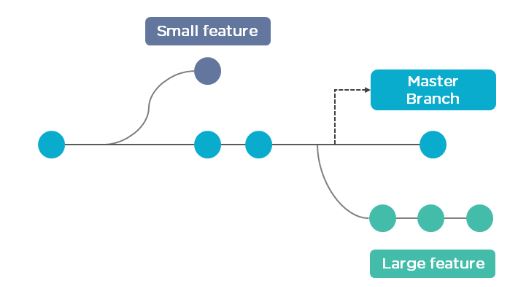
Branch in Git is used to keep your changes until they are ready. You can do your work on a branch while the main branch (master) remains stable. After you are done with your work, you can merge it with the main office. Branches allow you to work on different parts of a project without impacting the main branch.

Learn More about GitHub?...

branch in git